Slide 1 of 19
 Nanoscale · Module 03
Python and Jupyter for Neuroscience
Teaching Deck
Human cortex · H01
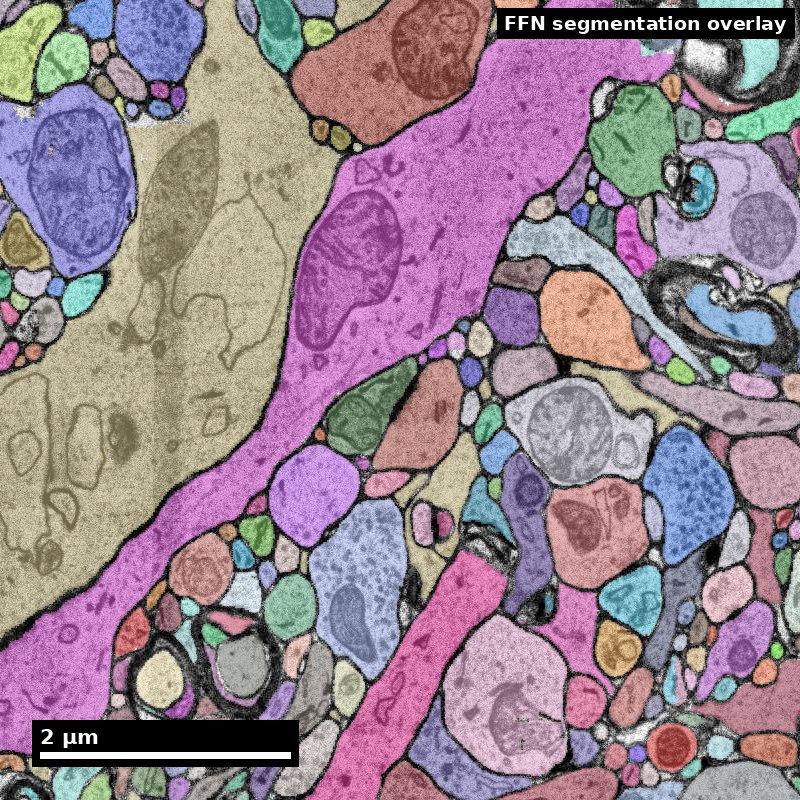
Object segmentation over electron microscopy
H01 release · Lichtman Lab / Harvard & Connectomics at Google · CC BY 4.0
Shapson-Coe et al. (2024) · doi:10.1126/science.adk4858
Slide 2 of 19
Learning Objectives
- Set up a reproducible notebook workflow
- Load and inspect connectomics data tables
- Write basic analysis and visualization code blocks
- Document assumptions and outputs for reuse
Slide 3 of 19
Capability Target
Create a reproducible Jupyter notebook that ingests a connectomics dataset slice, performs one analysis, and exports documented outputs. Demonstrate familiarity with the core Python libraries used in connectomics research: CAVEclient, CloudVolume, NetworkX, pandas, and matplotlib.
Slide 4 of 19
Concept Focus
1) Python as the lingua franca of connectomics
- Technical: the connectomics ecosystem is built on Python.
- Plain language: if connectomics has a common language, it is Python.
Figure description and teaching notes
Further teaching detail from the module:
**Technical:** the connectomics ecosystem is built on Python. CAVEclient queries the CAVE database for synapses, segments, and annotations. CloudVolume accesses volumetric data (EM images, segmentation volumes). NetworkX and igraph construct and analyze circuit graphs. NumPy and pandas handle numerical and tabular data. Matplotlib and Plotly produce publication-quality visualizations. Familiarity with these libraries is not optional --- it is the baseline for participation.
Slide 5 of 19
Concept Focus (continued)
- Misconception: you need to be an expert programmer to do connectomics.
- In practice: Most analyses use a small set of patterns (query, filter, aggregate, plot) applied to different datasets.
Slide 6 of 19
Core Workflow
- Set environment and dependencies (
requirements.txtwith pinned versions). - Initialize clients (CAVEclient, CloudVolume) and record dataset/materialization version.
- Load dataset and validate schema (check column names, data types, row counts).
- Run analysis cell sequence (filter, aggregate, compute metrics).
Slide 7 of 19
Core Workflow (continued)
- Visualize results (at least one plot with labeled axes, title, and caption).
- Save outputs + metadata (CSV/Parquet for data, PNG/SVG for figures, JSON for parameters).
- Re-run from clean kernel to verify reproducibility.
Slide 8 of 19
Run of Show (90 min)
- Block 1: Notebook anatomy (00:00-12:00)
- Block 2: Environment setup and library tour (12:00-28:00)
- Block 3: Guided analysis sprint (28:00-50:00)
- Block 4: Visualization and export (50:00-65:00)
Figure description and teaching notes
Block 1: Notebook anatomy (00:00-12:00)
Instructor script: "Open the sample notebook I have shared. Before we write any code, let's understand the structure." Walk through the five sections of a well-organized notebook:
Header: title, author, date, dataset version, materialization version.
Setup: imports and environment configuration.
Data loading: queries and schema validation.
Analysis: computation cells with markdown explanations.
Export: saving outputs with metadata.
Show a bad notebook (out-of-order cells, no markdown, hidden state) and a good notebook side by side. Ask: "Which one would you trust for a paper?"
Block 2: Environment setup and library tour (12:00-28:00)
Instructor script: "Let's set up our environment. Everyone run the first cell." Walk through installing and importing the core libraries:
`pip install caveclient cloud-volume networkx pandas matplotlib`
Demonstrate `pip freeze > requirements.txt` for version pinning.
Live demo of each library (2-3 minutes each):
CAVEclient: initialize client, query a synapse table, show resulting DataFrame.
CloudVolume: open a volume, download a small image cutout, display it.
NetworkX: build a tiny graph from 10 synapses, visualize it.
pandas: filter the synapse DataFrame by brain region, compute mean synapse count per cell type.
matplotlib: plot a histogram of synapse counts.
Block 3: Guided analysis sprint (28:00-50:00)
Instructor script: "Now you build. Your task: query synapses for a specific brain region, count connections between cell types, and plot the result. I will walk you through step by step, but you write the code."
Step-by-step guided coding:
Initialize CAVEclient and set materialization version (3 min).
Query synapse table filtered by brain region (5 min).
Group by pre/post cell type and count synapses (5 min).
Build a NetworkX graph from the grouped data (5 min).
Plot a bar chart of top 10 connections by synapse count (4 min).
Instructor circulates and helps with errors. Common issues: authentication tokens, version mismatches, column name typos.
Block 4: Visualization and export (50:00-65:00)
Instructor script: "A plot without labels is not a figure --- it is a sketch. Let's make yours publication-ready."
Learners add: axis labels, title, legend, caption in a markdown cell below the figure.
Export figure as PNG and SVG. Export data table as CSV with a header comment recording the query parameters and materialization version.
Demonstrate saving a metadata JSON file: `{"dataset": "...", "materialization_version": ..., "query_date": "...", "parameters": {...}}`.
Block 5: Clean rerun test (65:00-80:00)
Instructor script: "The moment of truth. Restart your kernel and run all cells. If anything breaks, that is a reproducibility bug --- fix it now."
Learners restart kernel and run all cells. Instructor helps debug common issues:
Cells that depend on variables defined out of order.
Cells that depend on interactive state (e.g., widget selections).
Missing imports that were run in a previous session.
Discuss: "Why does this matter? Because six months from now, you will need to regenerate this figure for a revision, and you will not remember what you did."
Block 6: Competency check and exit ticket (80:00-90:00)
Learners submit their completed notebook.
Instructor script: "Your notebook should pass three tests: (1) it runs from clean kernel without errors, (2) every output has a markdown explanation, (3) someone who has never seen your code can understand what it does and reproduce it."
Exit ticket: (1) link to submitted notebook; (2) one sentence describing the most useful library you learned today and why.
Slide 9 of 19
Run of Show (90 min) (continued)
- Block 5: Clean rerun test (65:00-80:00)
- Block 6: Competency check and exit ticket (80:00-90:00)
Slide 10 of 19
Misconceptions to Watch
- Misconception: you need to be an expert programmer to do connectomics.
- Misconception: if the code runs on my machine, it is reproducible.
- Misconception: version control is only for software engineers.
- Misconception: code comments are sufficient documentation.
Slide 11 of 19
A notebook is a repeatable chain
Treat the saved result as the output of a declared process.
- 1
Inputs
Table + version + units
- 2
Method
Run code in a stated order
- 3
Outputs
Labeled result + parameters
- 4
Clean rerun
Restart; run all; compare
Discuss: Which link in this chain is missing from your notebook?
Illustrative teaching scenario; see this module’s lesson and worked example.
Figure description and teaching notes
Visual description and discussion guidance:
The sequence represents dependencies, not a guarantee of reproducibility. A clean rerun checks hidden interactive state. A picture alone does not record the inputs or code that produced it.
Slide 12 of 19
A tiny result you can verify by hand
Synthetic counts, not a biological finding. No account or download needed.
Input and code
counts = {"A": 4, "B": 1, "C": 0}
total = sum(counts.values())
print(total)
print(total / len(counts))
Interpret the output
Total: 5
Mean across A, B, C: 1.666…
Discuss: What changes if the zero-count row is omitted?
Synthetic example; arithmetic checked by scripts/check_visual_design.rb.
Figure description and teaching notes
Visual description and discussion guidance:
All three rows give total 5 and mean 5/3. Omitting the zero-count row keeps the total but changes the mean to 5/2 = 2.5. Declare the population represented by the denominator. These are synthetic teaching values.
Slide 13 of 19
Studio Activity
Scenario: Learners produce a complete, reproducible Jupyter notebook that queries a connectomics dataset, performs a descriptive analysis, and exports documented results. The work runs in four parts: setup and data loading (20 minutes), analysis (20 minutes), visualization and export (15 minutes), and a reproducibility check (5 minutes).
Slide 14 of 19
Activity Output Checklist
- Evidence-linked artifact submitted.
- At least one limitation or uncertainty stated.
- Revision point captured from feedback.
Slide 15 of 19
Assessment Rubric
- Minimum: runnable notebook from clean kernel, clear outputs, basic metadata, at least one plot with labels.
- Strong: clean linear structure, robust error handling, repeatable rerun, markdown narrative explaining every step, exported metadata JSON, version-pinned requirements file.
- Failure: hidden state dependencies, undocumented assumptions, plots without labels, no dataset version recorded.
Slide 16 of 19
Exit Ticket
Add one markdown cell documenting input version, processing steps, and output files. Then write a code cell that queries a synapse table and computes the mean number of synapses per neuron for one brain region.
Slide 17 of 19
References (Instructor)
- Use module references listed on the module page.
Slide 18 of 19
Teaching Materials
- Module page: /modules/module03/
- Session kit: /teaching/sessions/module03/
- Worksheet: /assets/worksheets/module03/module03-activity.md
Slide 19 of 19
Read, review, or teach
The reading version includes figure descriptions and discussion guidance.
Nanoscale text: CC BY 4.0. Scientific figures retain their individual credits.